


Moj: Free Short Drama & Reels
4.1846.00 Reviews
App Specs
- Version
- 2026.26.3
- Updated On
- License
- Free
- Downloads
- 100,000,000+
- Developer
- ShareChat
- Categories
- Social
- Platform
- Android, iOS
Screenshots
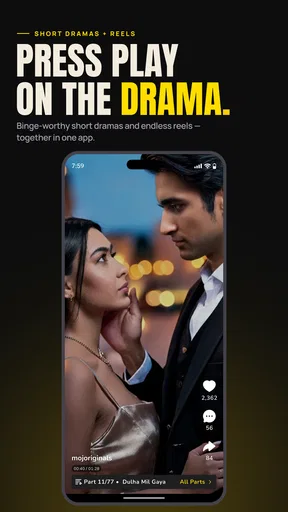
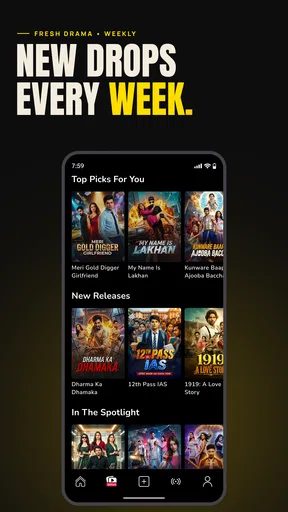
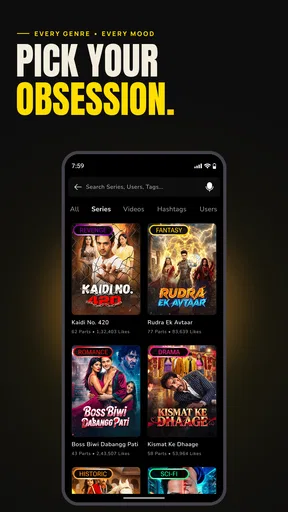
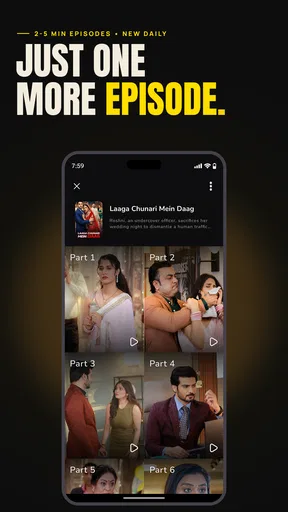
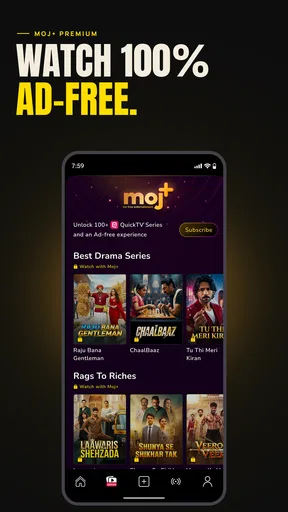
 Analysis by AppCompare
I find it useful to judge a social video app not only by how much it can entertain me, but also by how deliberately I can use it. With a feed built around quick clips and short dramas, Moj: Free Short Drama & Reels is easy to open for a few minutes and surprisingly easy to keep watching. That makes it worth considering if you enjoy short-form video, but it also makes your own boundaries and choices important.
Start with the kind of use you want
Moj is a free social app from ShareChat, and its short-video format suits small breaks better than long, focused viewing sessions. I can imagine opening it while waiting for a friend, watching a few comedy clips, then moving on without needing to choose a full-length show. It also gives creators a place to make and share brief performances rather than build a longer video from the outset.
The app is rated Teen, and it has an average rating of 4.3 from around two million ratings, with more than 100 million installs. Those figures suggest a large audience, but they do not tell me whether the feed will match my taste or how comfortable I will feel using it. I’d treat the first few sessions as a chance to decide whether the content and pace work for me, not as a reason to assume every clip will be suitable or appealing.
Trust is a question of choices, not assumptions
For any social platform, I think about what I can actually see and control rather than guessing at its behind-the-scenes practices. Moj’s core experience involves watching and sharing videos, and its social character means that public-facing actions such as posting, commenting, and sharing deserve a moment of thought. Before I upload, I consider whether I would be comfortable with the clip travelling beyond the audience I had in mind.
I would also take a careful look at the app’s current permission prompts and account settings on my device before using features that involve recording or sharing. Permission screens and controls can vary by operating system and app version, so I would make the choice at the time it appears instead of relying on a general assumption. If a prompt does not make sense for what I am trying to do, I can pause and decide whether that feature is worth enabling.
Small habits that make the feed easier to manage
One practical way to use a recommendation-led video feed is to be intentional about what I watch and interact with. If I want more comedy or short drama, I can spend my attention on those clips and avoid engaging with material I do not want to see more often. I would not expect any feed to understand my preferences perfectly, but consistent choices give me a clearer starting point than tapping on everything out of curiosity.
I also separate watching from creating. A quick scroll is low commitment; posting is different because it puts my own work into a social setting where other people may react or share it. For a first attempt, I would make a simple clip, review it before uploading, and check the audience and sharing choices shown in the app. That modest workflow helps me catch accidental details in the background and avoids treating a spontaneous recording as automatically ready to publish.
Worth Reading Before You Choose

Flipboard Shows What News Apps Must Do Beyond the Feed

Switching to Android Auto Means Rethinking Your Driving Routine

Google Calendar Makes a Crowded Week Easier to Manage

Ludo King Makes the Most of the Minutes Between Plans

Baby Panda World Brings Quick Play to Modern Phones, but Its Game Library Feels Busy

ESPN’s Live Game View Makes Following Close Games Easier
Where it fits beside other social video apps
Compared with a general social network, Moj puts short video closer to the centre of the experience. Compared with services built mainly around longer viewing, it is better suited to quick entertainment and brief creative experiments than to settling in for a sustained story. Its emphasis on local languages can also matter if I want to encounter creators and performances that feel closer to particular communities, rather than a feed shaped only around globally familiar trends.
That focus will not suit everyone. If I mainly want private conversations, careful control over who sees each post, or a quiet library of longer programmes, I would look for a service designed around those needs. Moj makes more sense when I want to browse, react, or try making short videos; it is less convincing as a substitute for a private messaging app or a long-form video catalogue.
Using Moj with a little more intention
I’d use this section to turn a casual scroll into a choice rather than a reflex: decide what you came to watch, and give yourself a natural stopping point before opening the feed. If you later want to post, treating that as a separate activity gives you time to review the clip and its sharing choices. That small pause is especially useful when a spontaneous idea includes other people or a recognizable background.
A realistic routine for watching and posting
Picture a short break between errands. I open the app for a few clips, find a style I enjoy, and stop when the break is over rather than letting the feed decide how long I stay. Later, if I have an idea for a skit, I can draft it when I have time to check the framing and sound, then review the finished video before sharing. Keeping those activities separate makes the app easier to fit into a day without turning every spare moment into a recording session.
For creators, I would treat a post as a small public introduction rather than a guaranteed route to an audience. The ability to share a video elsewhere can help it travel, but wider circulation also means less certainty about where it will be watched. I would choose clips I am comfortable standing behind and avoid including details about other people unless they are happy to appear. That is a useful trade-off to consider before chasing reach.
What the free label does and does not settle
The app is free to install, but it also offers in-app purchases, with listed items ranging from a few cents to nearly three hundred dollars. That range is broad enough that I would check the price shown for a specific item before confirming anything, especially if a younger family member uses the device. The Teen content rating is a useful starting point for deciding whether the app is appropriate, but I would still consider the individual viewer’s maturity and the content they encounter.
If cost is your main concern, you can begin with the free experience and decide for yourself whether any optional purchase has a clear purpose. I would not treat a purchase as necessary just to browse short videos. On a shared phone or tablet, it is sensible to review the device’s purchase confirmation settings too, since those choices can help prevent an accidental tap from becoming an unwanted charge.
Who is likely to enjoy it—and who may not
I would recommend giving Moj a try if you like short, varied videos, enjoy seeing creators from different language communities, or want a low-barrier place to experiment with brief performances. The app’s scale—more than 100 million installs—means there is a substantial pool of content and users, though a large audience can also make the feed feel busy. The current version is 2026.17.5, and it requires Android 7.0 or later; on a compatible device, the best test is whether its actual recommendations feel relevant after you have used it deliberately for a little while.
I would be more cautious if I dislike algorithmic feeds, find rapid clips distracting, or want strong assurance that every item will suit my preferences. Short-form platforms can make it easy to jump from one video to another, and that same convenience can work against a planned stopping point. A simple personal limit—such as opening the app only during a particular break—may be more effective than expecting the feed itself to provide a natural endpoint.
What I would check before settling in
People often wonder whether they need to post to enjoy a social video app. I do not think so: browsing can be the whole point, and creating is optional. If I decide to post, I would first explore the controls visible in my account and the choices presented at upload time. I would also check how the app behaves on my device, since loading delays or occasional crashes can interrupt an otherwise simple viewing session.
Another reasonable question is whether Moj is a better choice than the short-video features inside a social network I already use. I would choose based on the community and content I actually want, not on the assumption that one feed is universally better. Moj’s short-video focus and local-language emphasis are reasons to sample it; an existing platform may be more convenient if my friends and chosen creators are already there. Trying both briefly can answer that more honestly than comparing feature lists.
My cautious verdict
ShareChat’s app has the ingredients I look for in casual short-video entertainment: quick viewing, creative possibilities, and a broad social setting. Its 4.3 average rating reflects a generally positive reception, but my decision would still come down to the clips I encounter, the controls available to me, and whether the format fits my habits. I would start with a few intentional sessions, review permissions and sharing choices as they appear, and keep posting separate from private moments I do not want circulated.
If that balance sounds right, Moj is worth trying as a free way to explore short videos and make brief creative pieces. If you want a private-first space, dependable long-form viewing, or a feed that never needs active management, I would choose another kind of app instead. My recommendation is to give it a measured trial, decide what you want from it, and keep the final say over what you watch and share.
Discovering the World of Moj
So, what is Moj all about? Essentially, it’s a hub for short videos that allows users to create, share, and watch content that ranges from drama and comedy to dance and DIY. I’ve spent some time playing around with it, and let me tell you, it’s a rabbit hole of entertainment.
Creating Content with Ease
First off, let’s talk about user experience. I was pleasantly surprised by how intuitive the interface is. The app makes it super easy to shoot, edit, and upload videos. There are tons of editing tools and filters to play with, so you can really let your creativity shine. Plus, the transition effects are smooth, and there’s a great selection of music tracks to choose from.
A Community That Connects
One of the standout features of Moj is its community. It’s vibrant and diverse, with influencers and everyday users alike contributing to a wide range of content. Whether you’re into hilarious skits, serious monologues, or epic dance-offs, there’s something for everyone. The app encourages interaction, and it’s easy to engage with other users through likes, comments, and shares.
Why It’s Worth a Download
Now, why should you give Moj a go? For starters, it’s a fantastic platform for anyone looking to express themselves creatively. The app’s algorithm does a decent job of curating content based on your interests, so you’re always discovering new creators and styles. Plus, with its focus on local languages, Moj provides an inclusive space for users across different regions.
Another thing I noticed is how quickly content can spread. The app has a feature that allows videos to be shared across other social media platforms, meaning your content can reach a wider audience in no time. It’s an excellent opportunity for budding creators to gain visibility and grow their audience.
Room for Improvement
Of course, no app is without its quirks. While Moj is generally smooth, there are occasional hiccups, like videos taking a bit longer to load or the app crashing unexpectedly. But, I’m hopeful that future updates will iron out these minor issues.
Another point to consider is content moderation. Like any platform, ensuring a safe and positive environment is crucial. While Moj has measures in place, there’s always room for improvement in filtering out inappropriate content and maintaining a respectful community.
The Final Take
All in all, Moj: Free Short Drama & Reels is a solid app for anyone looking to dive into the world of short-form video content. Whether you’re a seasoned creator or just looking to have some fun, it’s a platform worth checking out. The ease of use, vibrant community, and potential for creativity make it an app I’d recommend to anyone eager to explore the world of reels and drama.
So, go ahead, download Moj, and start creating your masterpiece. Who knows? You might just be the next big thing on the platform!
Pros
- User-friendly interface
- easy navigation.
- Wide variety of short drama content.
- Supports multiple regional languages.
- Regular updates with new features.
- Offline viewing available.
Cons
- Limited editing tools for creators.
- Occasional app crashes reported.
- Ads can be intrusive at times.
- Content moderation needs improvement.
- Some features require stable internet.
FAQs for Moj: Free Short Drama & Reels
What is Moj: Free Short Drama & Reels?
Moj is a short video app that allows users to create and watch engaging short dramas and reels. With a variety of themes and effects, it provides a platform for users to express their creativity and connect with a community of like-minded individuals. It’s available for Android and iOS devices.
How do I create a video on Moj?
Creating a video on Moj is simple. After downloading the app, register or log in. Tap on the camera icon to record or upload your video. Use the editing tools to add effects, music, and filters. Once satisfied, you can publish it for others to view and enjoy.
Is Moj free to use?
Yes, Moj is completely free to download and use. The app offers a wide array of features without any subscription fees. However, it may feature in-app purchases or ads to support the platform, but these are optional and not necessary to enjoy the core functionalities.
Is Moj safe for children to use?
Moj provides a platform for users of all ages, but parental guidance is recommended for younger users. The app has community guidelines to ensure a safe environment, but parents should monitor usage and ensure that children are engaging with age-appropriate content.
Can I share Moj videos on other social media platforms?
Yes, Moj allows users to share their videos across various social media platforms. After creating a video, you can use the sharing options provided to post your content on platforms like Facebook, Instagram, and WhatsApp, helping you reach a wider audience.


